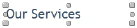
A text frame has two modes: Object mode and Edit mode.
■ In Object mode, the text frame appears with a transparent background and with handles. You move the frame around and can add fills, shadows, and other effects to the frame.
To select a text frame, click the text item once.
■ In Edit mode, the text appears as plain black text on a white background. An insertion point indicates where you can type. In this mode, you edit the text by adding, changing, and deleting characters.

To enter Edit mode, double-click a text frame. To exit Edit mode, click outside the text frame.
In general, keep each text frame larger than the text in the frame. Some browsers might display text in a larger font, and any text that doesn’t fit into the text frame won’t appear.